Computers, Tablets & Accessories / PRODUCT GUIDE
Acer UH501 USB-A hub guide: put four data ports within reach
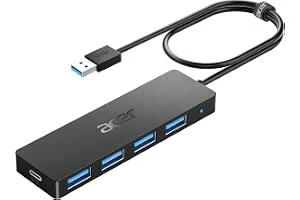
The ACER-UH501 variant linked here has a USB-A host plug, a two-foot tether and four USB-A data sockets. It helps when your computer already handles its display and charging and you need easier access to everyday peripherals.
As an Amazon Associate I earn from qualifying purchases.
View Acer 4-port USB-A hub on Amazon (paid link) ↗
Check the plug in the listing
This ASIN is the two-foot USB-A version. Check for a rectangular USB-A socket on the computer and use that connection to judge whether this model is useful. Other listings carry different plug types or cable lengths. A short lead can hang from the side of a laptop, and a longer one can reach a desk from a tower. Measure the actual route, including the turn around the rear of the machine.
Set up the peripherals you remove the most
A desk hub works well for a removable drive, a wired controller or a peripheral you disconnect between shifts. Put it where you can pull a drive without pulling at the cable behind the computer. An oversized receiver or stick-shaped drive can block part of an adjacent socket. Leave the largest plugs on different sides of your setup or connect them one at a time if clearance is tight.
Read 5 Gb/s as a link rate
The UH501 documentation lists USB 3.0 speeds up to 5 Gb/s. The four devices share the uplink to the host, so four active drives do not each get that bandwidth. If an SSD is part of an editing or regular backup workflow, start by trying the SSD directly in the computer’s fast port and let the hub handle the remaining devices. A keyboard and receiver seldom need the same bandwidth as a large file copy.
Understand what the extra USB-C socket powers
The hub documentation describes a 5 V USB-C input to supplement power for attached devices. That input does not connect the hub to the computer for data or provide USB-C Power Delivery charging to the laptop. If a portable drive disconnects, follow the hub documentation for external power or connect the drive to the computer directly. Don’t count that socket as a fifth data connection.
Compare UGREEN CM478 for one screen and USB-C
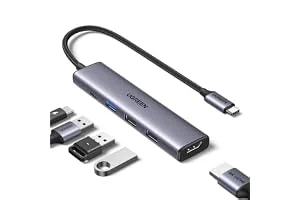
The 15495 connects to USB-C and can add an HDMI display to a laptop with compatible DisplayPort Alt Mode. It has one faster USB-A port and two USB 2.0 sockets. Use the Acer for a USB-A host or more USB-A peripherals, and the UGREEN if a single external screen is the reason you need an adapter.
Compare Anker 553 when the desk needs network and media ports
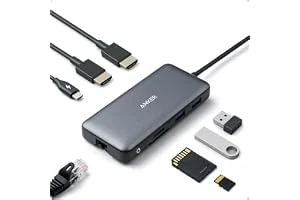
Anker’s A8380 adds Ethernet, SD and microSD readers and two HDMI sockets, with display behavior depending on the host. If your audio, network and monitor are already set up, the extra features can be unnecessary. This buying guide uses the documentation mapped to the model. Ryan has not measured throughput or tested connected devices.
Compare the shopping options
UGREEN CM478 — USB-C host and single HDMI output
Anker 553 A8380 — USB-C dock with Ethernet, HDMI and card readers
Sources and review basis
Researched November 20, 2026. Ryan’s own experience is attributed where supplied. Other judgments are buying advice based on the cited product information, not a hands-on comparison or laboratory test. Prices and availability are checked at the retailer.