Computers, Tablets & Accessories / PRODUCT GUIDE
Anker 140W A2697 charger guide: choose ports for the devices you actually charge
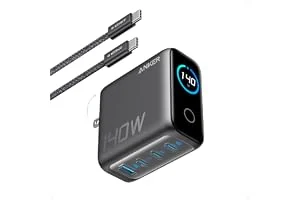
The A2697 offers three USB-C ports, one USB-A port and a display in a folding-plug charger. The published port-sharing table matters more than the headline wattage when several devices are plugged in.
As an Amazon Associate I earn from qualifying purchases.
Pick a port for a single high-power laptop
Anker rates USB-C1 and C2 for up to 140 W when each is the only port in use. The published 140 W profile is 28 V at 5 A, which requires a compatible host and USB-C cable rated for the negotiated power. USB-C3 is rated for up to 40 W alone. If your laptop still uses a proprietary adapter or cannot accept the appropriate USB-C profile, check its requirements before counting on this charger to replace it.
Look at the exact two-port pair you plan to use
A laptop on C1 and a phone or tablet on C3 gives you a listed allocation of 100 W plus 40 W. If you instead fill C1 and C2, Anker lists 70 W for each. That difference is practical if you charge a laptop that needs close to 100 W while editing. Put the secondary USB-C device on C3, then check what your own devices report while plugged in.
Plan for four devices as a different charging schedule
The four-port table lists 65 W, 45 W, 12 W and 12 W for C1, C2, C3 and USB-A respectively. That can cover moderate charging for a collection of gadgets. It gives the primary laptop less headroom than one port alone, and it leaves slower charging on the last two ports. Charge the most demanding device separately when its normal adapter draws more than the shared allocation.
Check the plug and the screen in your intended spot
The charger measures about 2.72 by 2.72 by 1.42 inches and Anker lists it at more than 10 ounces. Where the outlet sits can affect whether adjacent sockets and the display are easy to reach. An accessible power strip may be a better fit than a recessed outlet behind a cabinet. The display is useful for seeing the charger’s reported split, while actual input remains dependent on the devices and cables. No electrical or thermal testing by Ryan is claimed.
Compare Anker 317 A2672 for one travel device
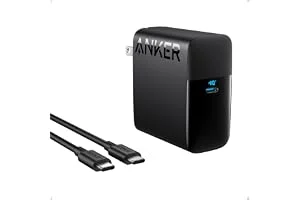
The 317 has one USB-C output rated at up to 100 W. It suits a laptop you charge on its own and does not divide power among devices. Choose the A2697 if you need extra sockets or the supported 140 W profile.
Compare Anker Prime A2687 for an all-USB-C kit
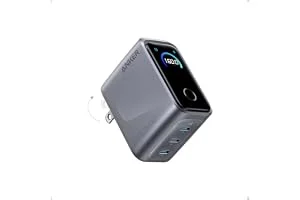
The Prime has three USB-C outputs and Anker lists a higher 160 W aggregate ceiling. Look up the sharing for your own devices because that is a combined maximum. The A2697 is the more convenient layout when one of your regular charging cables still uses USB-A.
Compare the shopping options
Anker 317 100W A2672 — single-device USB-C charger
Anker Prime 160W A2687 — three USB-C ports with a higher combined ceiling
Sources and review basis
Researched November 20, 2026. Ryan’s own experience is attributed where supplied. Other judgments are buying advice based on the cited product information, not a hands-on comparison or laboratory test. Prices and availability are checked at the retailer.