TV, Streaming & Electronics / PRODUCT GUIDE
Anker Nano A87E0 USB-C to HDMI cable guide for a meeting-room display
This six-foot braided lead connects a compatible USB-C video source to an HDMI display. Anker rates it for up to 4K at 60 Hz and lists HDR support. It is a good fit when an existing HDMI screen needs a single cable from your laptop.
As an Amazon Associate I earn from qualifying purchases.
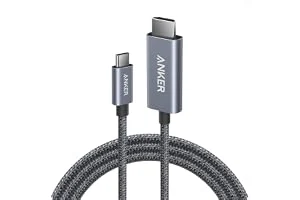
View Anker HDMI Cable, 4K@60Hz Ultra-Fast USB C to HDMI Cord, 6ft on Amazon (paid link) ↗
Check for video on your source’s USB-C port
Find the video-output entry for the exact laptop or tablet model. DisplayPort Alt Mode and supported Thunderbolt ports are the terms to look for in this setup. A USB-C connector by itself tells you the plug shape. If the device has more than one such port, check which one the manual specifies for a display.
Start a presentation with a direct connection
Connect the USB-C end to the source and the HDMI end to the TV or projector, select the input and check the resolution options. Decide whether to mirror the computer or extend its desktop before launching the presentation. Extend if you need private presenter notes and the application supports that arrangement. Try the direct connection first if a switch or long cable run in the room behaves differently.
Plan charging and placement separately
This link carries the video and audio connection to the display. If you need power while you present, plan to use a separate charging port or consider a suitable dock with pass-through power. Measure the distance from the speaking position to the chosen input. Six feet can be tight after accounting for a table edge or a wall-mounted panel. Ryan did not test specific laptops or HDR modes.
Compare Anker A8742 when the source already has HDMI
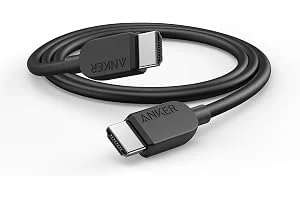
The six-foot A8742 joins two HDMI ports and is the relevant model when a console, computer or set-top box already provides that output. Pick the A87E0 when the video signal needs to come from a supported USB-C port.
Compare Anker 553 A8380 for a desk with more connections
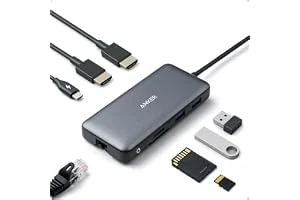
The hub gives a compatible laptop ports for additional accessories as well as HDMI and supports pass-through power with the proper equipment. Check its display and operating-system limits first. The single A87E0 cable is easier to carry when your only job is to connect one screen.
Compare the shopping options
Anker A8742 six-foot HDMI cable — direct HDMI on both devices
Anker 553 A8380 USB-C hub — display and accessory ports for a compatible laptop
Sources and review basis
Researched November 20, 2026. Ryan’s own experience is attributed where supplied. Other judgments are buying advice based on the cited product information, not a hands-on comparison or laboratory test. Prices and availability are checked at the retailer.