Computers, Tablets & Accessories / PRODUCT GUIDE
AZIO IZO White Blossom: a clicky compact keyboard for a styled desk
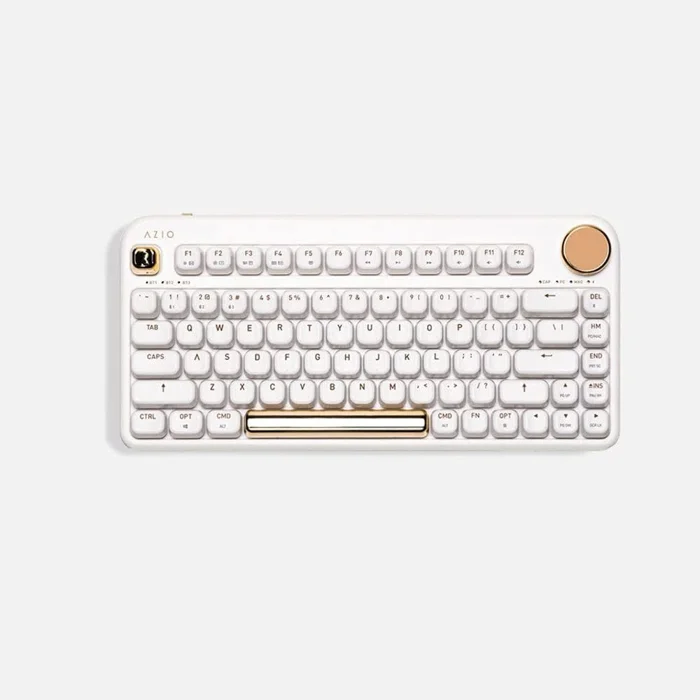
The AZIO IZO White Blossom pairs a pearl-and-gold finish with Gateron Blue clicky switches, a dual-function knob and Bluetooth or USB-C connection. It is an expressive mechanical keyboard with practical controls, but the sound, layout and Bluetooth setup are more important buying questions than its 21 lighting modes.
As an Amazon Associate I earn from qualifying purchases.
View AZIO IZO mechanical keyboard, White Blossom on Amazon (paid link) ↗
Match the White Blossom model
The Amazon item is AZIO IZO White Blossom, model IK103, with a U.S. QWERTY layout. AZIO also sells the IZO family in other colors and switch variants; listings may combine the photographs. Check that the exact selected option is White Blossom and Blue Switch before ordering. The maker lists dimensions of about 12.6 by 5.8 inches, a 320 by 150 mm footprint and weight around 793 g.
Gateron Blue means a deliberate clicky sound
This version uses Gateron Blue mechanical switches. AZIO describes them as clicky with tactile feedback, a feel some typists like for clear key presses. The same audible click can be a poor fit for a shared office, a quiet room, late-night typing near someone sleeping, or a microphone on the same desk. If you want a quieter board, choose a quieter switch type or a membrane keyboard instead of hoping backlighting changes the sound.
The knob gives the board a working shortcut
The gold control knob handles both media volume and backlight functions. That makes a physical adjustment available without reaching for a separate control panel, and it contributes to the IZO’s vintage-inspired appearance. AZIO also specifies 21 lighting modes. These are comfort and desk-style features; they do not change the typing layout or make the board more productive by themselves.
Bluetooth and USB-C offer two ways to connect
AZIO lists Bluetooth 5.0 and a wired USB-C mode, plus a 5,000 mAh rechargeable battery. The USB-C cable is included. The maker notes that a Bluetooth adapter is not included, so a desktop without built-in Bluetooth may need a separate adapter or the wired connection. Wired mode is also a straightforward way to avoid pairing questions during setup.
Check the operating-system details
AZIO lists the keyboard for Windows and macOS, and its hybrid keycaps show both operating-system legends. The product page’s technical notes include version-specific compatibility wording, so verify current system support if you use a newer Mac, a managed work computer, or a device with a restricted Bluetooth policy. The keyboard’s basic USB mode may be the simpler route when you cannot install a dongle or troubleshoot pairing.
Expect a compact layout rather than a full office board
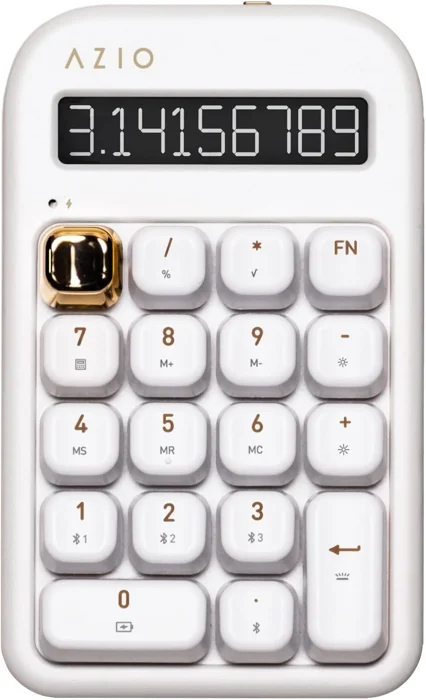
AZIO positions the IZO as a compact keyboard, not a numeric-keypad-heavy workstation layout. If your day includes frequent number entry, plan for an external keypad or choose a full-size board. The matching IZO calculator/number pad is sold separately; it adds a coordinated desk accessory, but it does not come in the keyboard box.
Compare Logitech MK270 when function matters more than design
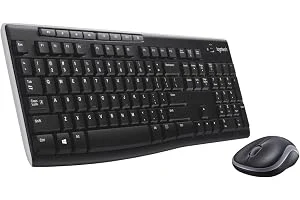
The photographed Logitech MK270 is a practical full-size wireless keyboard-and-mouse combo with a separate number pad and a small USB receiver. It uses a conventional, non-mechanical typing feel and lacks the IZO’s mechanical clicks, decorative finish, knob and backlighting. Choose it for a straightforward keyboard-plus-mouse setup; choose AZIO when the clicky switches, compact style and integrated knob are the features you will enjoy every day.
When the AZIO companion keypad is worthwhile
The photographed AZIO IZO calculator/number pad is a matching accessory rather than a competing keyboard. It is useful if you like the IZO design but need occasional numeric entry at the side of a compact board. Because the keypad is a separate purchase, add its price to the total and check the selected color and switch variant before treating the set as a single bundle.
Buying call
Choose the IZO White Blossom if you want a distinctive compact mechanical board, enjoy audible Gateron Blue switches, and will actually use Bluetooth or USB-C plus the volume/light knob. Skip it for a quiet shared workspace, a built-in number pad, or a no-setup keyboard-and-mouse bundle. Compare Logitech MK270 for practical full-size typing, and budget separately for the IZO number pad if you need it. Ryan has not claimed to own or test the IZO; this guide is based on AZIO’s model-specific product details and Logitech’s published comparison specifications.
Compare the shopping options
Logitech MK270 keyboard-and-mouse combo — full-size layout, number pad and USB receiver
AZIO IZO calculator / number pad — matching separate add-on for numeric entry
Sources and review basis
Researched November 19, 2026. Ryan’s own experience is attributed where supplied. Other judgments are buying advice based on the cited product information, not a hands-on comparison or laboratory test. Prices and availability are checked at the retailer.
- AZIO official IZO Wireless Keyboard page: model, switch, knob, lighting and connection details
- AZIO IZO keyboard user guide: setup, key functions and USB/Bluetooth operation
- Amazon listing for AZIO IZO White Blossom, ASIN B09KRF3LXF (paid link)
- Logitech official MK270 overview: full-size keyboard, number pad, mouse and USB receiver
- Amazon catalog listing for the photographed Logitech MK270, ASIN B079JLY5M5 (paid link)
- AZIO official IZO Numpad / Calculator product page
- Amazon catalog listing for the photographed AZIO IZO number pad, ASIN B09L3WWY8T (paid link)