Computers, Tablets & Accessories / PRODUCT GUIDE
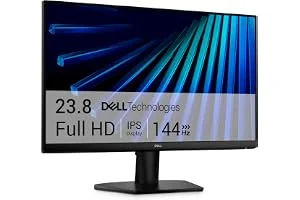
Dell SE2426H monitor: compact 144Hz Full HD for work and play
A model-specific look at this 23.8-inch IPS screen, its two HDMI inputs, stand limits and how to decide between a smaller gaming display and a sharper 4K alternative.
As an Amazon Associate I earn from qualifying purchases.
Confirm the exact SE2426H
This guide covers Dell 24 Monitor SE2426H, Amazon catalog item B0GLQXKKVY. Dell lists a 23.8-inch viewable IPS panel, 1920 × 1080 resolution, 144Hz maximum refresh rate and FreeSync. It is a 16:9 Full HD screen, not one of Dell’s 1440p or 4K models. If a listing lets you choose a different size or refresh rate, recheck the model number before checkout.
A 144Hz refresh rate depends on the computer too
The screen can refresh up to 144 times per second, which can make motion feel smoother than a 60Hz display when the computer supplies a matching signal. Dell lists two HDMI 1.4 inputs and says they support Full HD at up to 144Hz. Check the laptop or graphics card’s actual output and cable path; an incompatible port, dock, resolution or setting can keep a setup below the display’s maximum. The monitor cannot create extra frame rate that the computer does not produce.
IPS and Full HD make a particular kind of tradeoff
The IPS panel provides wide viewing angles, and Dell lists 300 nits brightness and a 1,000:1 native contrast ratio. At 23.8 inches, Full HD is a straightforward desktop resolution for everyday work and gaming. People editing large 4K video timelines, displaying dense spreadsheets or wanting fine text may prefer a higher-resolution screen. For photo and video color work, compare measured reviews and the exact color requirements of the job; this guide does not claim calibration or hands-on color testing.
The two HDMI ports help switch sources
Dual HDMI inputs let you connect two HDMI devices, such as a computer and console, and change inputs without unplugging a cable. Dell lists HDMI 1.4 with HDCP 1.4 and includes an HDMI cable in the box. There is no DisplayPort input listed for this model, so check your PC or dock before ordering. If your setup relies on DisplayPort or a USB-C display connection, this simple monitor may need a different adapter or another model.
Adjustability is limited but the mount options help
The included stand adjusts by tilt, not height. Dell lists a -5° to 21° tilt range and a 100 × 100mm VESA mount pattern. That means you can aim the screen, but a riser or monitor arm may be needed to place it at your preferred eye level. Measure the desk and check the stand footprint if space is tight. “Adjustable stand” can be misleading when you need height adjustment specifically.
FreeSync and response-time labels need context
Dell lists AMD FreeSync and a 1ms MPRT figure, as well as 4ms GTG in Fast mode and 8ms GTG. Those are different response-time measurements, not a guarantee that every pixel transition is blur-free at every setting. FreeSync can help match refresh behavior with compatible graphics hardware. Treat the feature as support for smoother gameplay, not proof that this is a high-end esports panel.
Choose it when a 24-inch Full HD screen is the point
This is a sensible shortlist for a compact desk, casual gaming or a second computer screen when 144Hz Full HD fits the graphics hardware. It is less compelling if the primary goal is sharper 4K editing, a larger workspace or extensive ergonomic adjustment. Dell includes the stand, power cable and HDMI cable, but confirm the exact retailer package for the selected option. There is no built-in webcam listed.
Compare a smaller 144Hz screen and a 27-inch 4K model
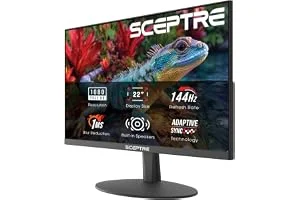
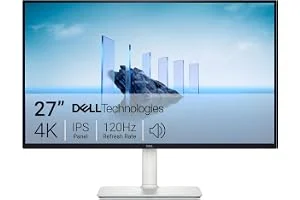
Sceptre’s 21.5-inch E225W-FW144G is another 144Hz Full HD display; Sceptre lists DisplayPort alongside two HDMI ports and a 75 × 75mm VESA pattern, while the smaller panel may suit a tight desk. Dell S2725QS moves the other way with a 27-inch 3840 × 2160 display up to 120Hz, HDMI 2.1, DisplayPort and built-in 5W speakers. The 4K model needs a PC capable of driving 4K smoothly. Both comparison cards below have product photos and Amazon links.
Compare the shopping options
Sceptre 22-inch E225W-FW144G — compare smaller 144Hz FHD and DisplayPort
Dell S2725QS 27-inch 4K — compare resolution and speakers
Sources and review basis
Researched November 18, 2026. Ryan’s own experience is attributed where supplied. Other judgments are buying advice based on the cited product information, not a hands-on comparison or laboratory test. Prices and availability are checked at the retailer.
- Dell official SE2426H specifications, ports, response modes and VESA mount
- Sceptre official E225W-FW144G (2025) specs and included connections
- Sceptre official E225W-FW144G support specifications
- Dell official S2725QS 27-inch 4K monitor specifications
- Dell SE2426H catalog ASIN and dated bestseller snapshot