Camera & Creator / PRODUCT GUIDE
Hollyland LARK M2 Mini Combo guide for switching between camera and phone
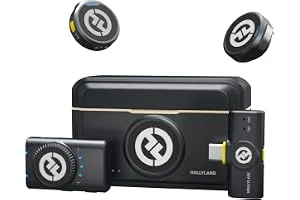
The black B0FZBS9RR4 pack has two LARK M2 transmitters, a charging case, a camera receiver and a USB-C receiver. It is useful when one creator alternates between a camera with a compatible mic input and a supported USB-C phone.
As an Amazon Associate I earn from qualifying purchases.
Choose the receiver before setting up the shoot
Use the camera receiver and the included 3.5 mm TRS lead with a compatible camera. Use the small USB-C receiver on a compatible phone during a mobile setup. Hollyland also offers a separate Lightning receiver in other LARK M2 configurations. This exact package documents the camera and USB-C receivers, so check your older phone’s port before ordering by the LARK M2 name alone.
Use separate audio channels where the camera setup supports them
For interviews, confirm how the camera receiver’s mono and stereo settings route your two speakers before the actual conversation. A short recording with the first person speaking alone and then the second person makes it easy to check both inputs. Decide whether you want a combined signal or separately editable channels, and verify the result in the files your camera produces.
Place the button transmitters to prevent clothing noise
Hollyland specifies 48 kHz and 24-bit audio for the system and describes several mounting options for the small transmitters. Those specifications help compare devices, while whether a mic touches a collar or loose jacket matters to the recording you get. Ask each speaker to turn and sit normally, then listen to a clip. Try the supplied wind protection outdoors. Ryan did not test this exact kit.
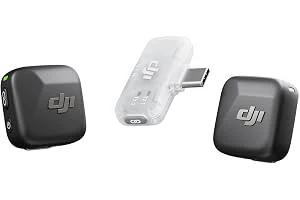
Compare DJI Mic Mini Mobile if you film only on a USB-C phone
The linked DJI bundle is organized around a mobile receiver. It is a better fit when you want fewer parts to carry and your work stays on the phone. Buy the LARK M2 configuration with both receivers when working with a 3.5 mm camera is also part of your routine.
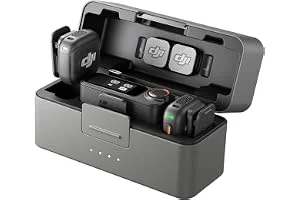
Compare DJI Mic 3 if you want transmitter-side audio files
The Mic 3’s internal recording allows you to save a local copy and use it during editing. It makes more sense for takes that are difficult to repeat. The LARK M2 Mini Combo focuses on getting audio to either of the two documented receiver types.
Compare the shopping options
DJI Mic Mini Mobile two-person kit — dedicated USB-C phone receiver
DJI Mic 3 two-person kit — transmitter-side recording and timecode
Sources and review basis
Researched November 20, 2026. Ryan’s own experience is attributed where supplied. Other judgments are buying advice based on the cited product information, not a hands-on comparison or laboratory test. Prices and availability are checked at the retailer.