Computers, Tablets & Accessories / PRODUCT GUIDE
UGREEN CM478 5-in-1 USB-C Hub guide: what earns a spot in your laptop bag?
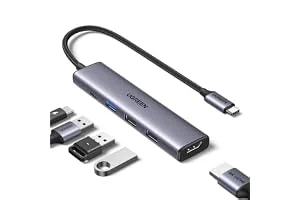
The gray CM478, SKU 15495, adds one HDMI output, three USB-A ports and a USB-C charging input. It makes sense for a small travel kit built around a projector or a single display.
As an Amazon Associate I earn from qualifying purchases.
Pack it for a presentation and older accessories
Picture arriving in a meeting room with an HDMI cable in the table and a USB-A slide remote in your bag. The CM478 gives both a place to plug in, plus room for a spare accessory. Check that the USB-C port on the presenter’s laptop supports DisplayPort Alt Mode before making this your only adapter. A laptop can charge through USB-C and still lack display output on that specific port.
Know what 4K at 30 Hz feels like
UGREEN rates the 15495’s one HDMI output for 4K at 30 Hz. Slides and static reference material are a sensible match. For constant pointer movement, long spreadsheet scrolls or motion editing, a verified 4K60 setup is a better fit. In a meeting room with a 1080p projector, check what your computer and the projector negotiate before a presentation and use that mode when rehearsing.
Put the drive on the one fast USB-A port
The hub has one USB-A port rated at 5 Gb/s and two USB-A ports rated at 480 Mb/s. Put the drive with the video files on the faster port and use the other two for receivers, keyboards or simple peripherals. If copying between two fast portable drives is a normal part of your job, this model leaves one of them on a slower connection. Choose a hub with two documented high-speed ports for that routine.
Make room for the charger and the short cable
The USB-C PD socket is rated for an input of up to 100 W. The power available at the laptop depends on the charger, cable, host and hub overhead. Set the little hub beside the laptop and see whether your HDMI plug and charging cable can exit without pulling on the fixed tether. A hard case or a raised laptop stand can turn an otherwise tidy arrangement into an awkward fit.
Count what stays in your bag
There is no built-in wired Ethernet jack or memory-card slot, so bring those separately if a venue needs a wired connection or if you will offload photos from an SD card. The five connections here suit a narrow travel workflow. This is a specification-based guide and does not include hands-on compatibility or transfer benchmarks by Ryan.
Compare the Anker 553 if this will become your permanent dock
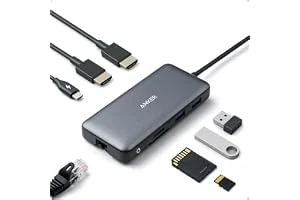
The A8380 handles wired Ethernet, SD and microSD, and offers two HDMI sockets, subject to the host’s display capabilities. Its support for one display at up to 4K60 on a compatible DP 1.4 host makes it a better candidate if desk use matters as much as travel.
Compare Acer UH501 for peripherals without a display connection
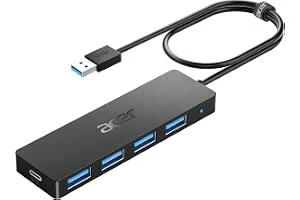
Use Acer’s four-port USB-A hub if you are short of data ports on a computer that already has the display and power cables sorted. It is also a direct fit for machines that lack usable USB-C. The extra data socket is more valuable than HDMI and charging pass-through for that particular job.
Compare the shopping options
Anker 553 A8380 — Ethernet, card readers and more display options
Acer UH501 — four USB-A data ports for an existing workstation
Sources and review basis
Researched November 20, 2026. Ryan’s own experience is attributed where supplied. Other judgments are buying advice based on the cited product information, not a hands-on comparison or laboratory test. Prices and availability are checked at the retailer.